
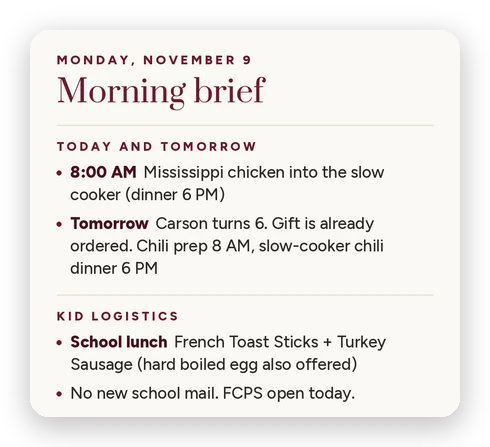
The short version
- Every morning, my AI assistant sends me one message with the calendar, school stuff, dinner, deliveries, deadlines and the weather.
- It pulls together what I’d normally check in so many different places, and only includes what I need to know or do something about.
- Any AI assistant can do this if you connect it to your email and calendar and tell it what’s important. I use Muse, Meta’s AI assistant.
- It doesn’t send an email or unsubscribe me from anything without my approval (the one exception: reminders to my husband).
- Just want the instruction? Jump to it.
The things that sneak up on me are never the big ones.
It’s spirit week, at the bottom of a school email. A survey with a deadline. A volunteer sign-up for a holiday party. I either overlooked it, or I saw it and never got it onto the calendar.
There are so many places to check
With kids, the information lives everywhere. There’s an app for school and a different one for daycare. The lunch menu is on a whole different website. I’ve got my personal calendar, the family calendar, my email, and all my tasks and appointments. School hours. And the weather is in another app.
That’s a lot of places to check before 7 AM.
My AI assistant knows all the places to look. Every morning it pulls it all together for me in one message, before the kids are up, while I still have a minute to think.
What does my morning brief look like?
Every weekday at 6:30, my AI assistant sends me a short message in chat. I’m up earlier than that, but 6:30 gives me time to read it before the kids are up at 7.
I use Muse, Meta’s AI assistant. I call my AI assistant Percy, short for personal assistant. I’ve done this with Claude before too. ChatGPT, Gemini, Grok… any of them can do this. It just needs to be connected to your email and your calendar, and then you tell it what’s important.
Here’s what mine covers:
| Section | What’s in it |
|---|---|
| Today and tomorrow | What’s on the calendar, with anything I need to prep |
| Kid logistics | The school lunch menu, and anything from school |
| Weather | What it means for getting dressed |
| Meals | Today’s dinner, and anything to start or pull out of the freezer this morning |
| Inbox | What it archived, one line per delivery, and what still needs me |
| Deadlines and money | Bills that actually need paying (anything on autopay stays out), and decisions with a date |
| Coming up | The next few days, only the parts that need action |
On a real Monday that looked like “Tomorrow: Carson turns 6. Gift is already ordered.” And “Hulu bundle price-update decision due before Nov 20.” And “Finalize spring break plans: deposit still not placed.”
How do I set up a morning brief?
Connect your AI assistant to your calendar and email, decide what you want to see each morning, and give it one instruction with your rules. Ask for it at a time that works for you. Then correct it for a few weeks. The corrections are what make it useful.
- Connect your calendar and email. Check what your AI assistant can connect to. Some assistants can also run something on a schedule. If yours can’t yet, ask for your brief each morning instead.
- Decide what you want in it. Start with the calendar, the weather and anything from school. Then think about the other places you check every morning. It doesn’t have to match mine. Maybe it’s the news headlines, last night’s score for your favorite team, traffic for your commute, or a website you always pull up. Add the rest as you go.
- Pick when and where it shows up. Mine comes in chat. Email works. At work, Slack works. Pick a time after you’re up and before the morning gets loud.
- Give your AI the instruction below. It’s a starting point, not my exact setup. Change anything that doesn’t fit your house.
A starting point for your AI (swap in your own time and the things your family needs)
Every morning at [the time you want it], send me a short brief for the day. Look at my calendar for today and the next few days, my email, and the weather where I live. Only include things I need to know or do something about. Leave out anything already handled, paid automatically, or settled. Give anything from my kids’ school, district, teacher or PTA its own line. Tell me what’s for dinner and if I need to start or thaw anything this morning. Turn the weather into what to wear, and warn me if a big storm is coming so I can prepare. Never send an email or unsubscribe me from anything without asking me first.
What should I tell it is important?
Only what needs you. If it doesn’t need your eyes or your action, it doesn’t belong in the brief.
School mail gets its own line. I told mine to read anything from the school, the district, my daughter’s teacher and the PTA, and flag what I need to know. When something like a spirit week comes up, it checks with me first. If I say yes, it goes on the calendar, and I get a reminder the day before and the day of.
Deliveries get one line each. With holiday shopping, I like knowing what’s coming and when. Then the email gets archived.
Weather means what to wear, and what to prep for. Cold in the morning and warm by recess means layers they can take off. And if a big storm is coming, it tells me early enough to get ready for it.
Skip empty sections. A short brief is a good brief.
Confession: I still try to read the school emails myself when I get a chance. This way I just don’t miss something.
Can I add fun stuff too?
Yes. Your brief doesn’t have to be all logistics. Add a few things you actually look forward to reading in the morning:
To add one, put a line at the end of the instruction, like: “At the end, give me last night’s score for [your team] and the top local news for [your town].”
Should I give AI access to my email?
I didn’t hesitate. But I understand why people would. Email is connected to so many accounts and systems. That’s also what makes it useful here.
So mine has limits:
- It never sends an email without my explicit approval. The one exception is reminders and information it passes to my husband.
- It can archive things for me on its own. Archiving just moves them to a separate folder.
- It never deletes anything. I don’t ever want it to erase something I needed.
- It can’t unsubscribe me from anything without my approval. It can suggest things to unsubscribe from.
- It drafts replies to basic things. For low-risk emails, like asking a company for a quote, it can send them once I approve.
Yours can be stricter than mine. Start with reading only, and add more when you’re comfortable.
How do I get it right over time?
Tell it when something isn’t useful, and keep the correction.
Mine got better one correction at a time.
- School mail used to get folded into other bullets, so I told it to give school its own line.
- It used to check only recent mail, and old things sat in my inbox. Now it looks at everything that’s still there.
- Reminders were popping up in the middle of my workday. I moved them into the brief, when I can actually do something about them.
- It used to tell me there was no school on Saturday… I asked it to stop.
The brief I get now came from a lot of small fixes… each one kept.
What does it get wrong?
It reads what’s there, even when what’s there is a little off. I saved a hotel stay on my calendar as full-day events, and it thought I was staying an extra day.
So check anything that matters. And if a calendar event is set up in a weird way, tell your AI what you actually meant.
Is it worth setting up?
In a 2024 University of Bath study of 3,000 US parents, mothers handled about 71% of the household tasks that take planning and remembering, compared with 45% for fathers. Pew Research Center found 47% of mothers say parenting is tiring all or most of the time.
A morning message won’t fix that. It does take one thing off the list.
I really like knowing my inbox is one thing I don’t have to worry about so much. I don’t feel like I constantly have to be checking it. I check it when it’s convenient for me.
It’s not making coffee for me. I just use a timer. But my mornings are a little calmer.
Keep going: how I stopped buying birthday gifts the morning of · how AI helps me plan holidays before they sneak up on me · how AI knows what food is in the bottom of my freezer
About the author: Heather Pocorobba has spent 15 years in communications, simplifying complex topics and answering the question “what does this mean for me?” She writes AI at Home with Heather, showing how anyone can use AI to get more of the household to-do list done without giving up family time.
Leave a Reply