
The short version
- Our family’s information lived in a few different places, and nothing showed all of it.
- I had AI build us a family app. It shows the calendar, tonight’s dinner, the kids’ chores and the shopping list, and it runs on an old tablet we already had.
- I’m not a coder. Claude, the AI assistant I use most, did the technical work. I did the sign-ins and told Claude what I didn’t like.
- I expect mine to cost a dollar or two a month to run. There’s a free version with fewer features.
- You can try the sample app before you decide anything.
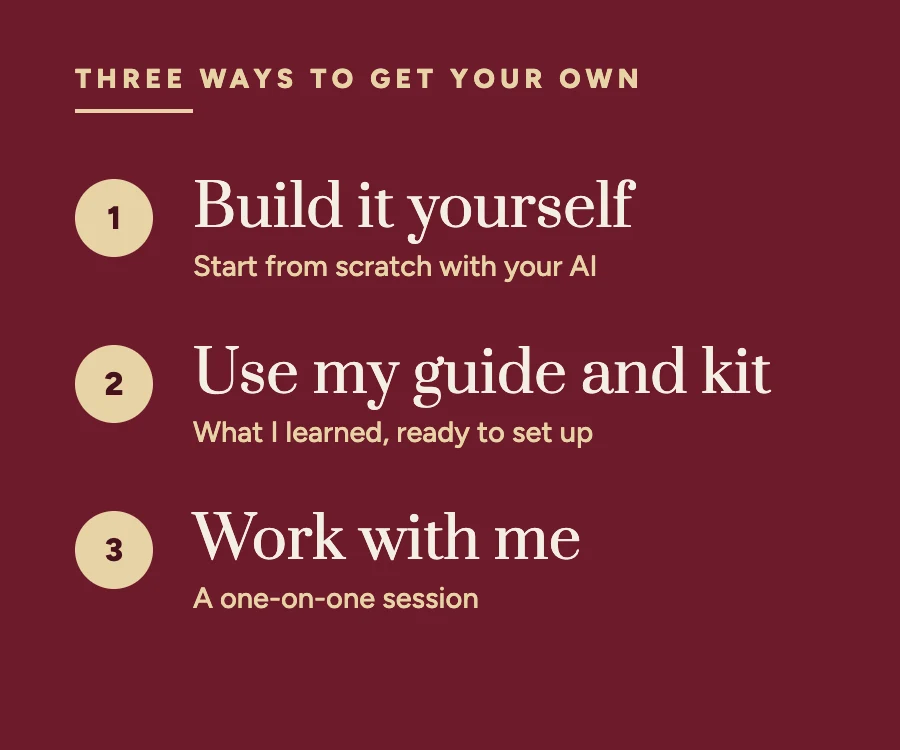
- There are three ways to get your own: build it yourself, use my guide and kit, or work with me.
- Jump to the instruction
I feel like we’re always going a few different places for information.
I had started printing the meal plan for the week and putting it on the fridge. But that didn’t have the calendar events. Those lived on my phone.
And the stuff the kids needed to do? That was mainly me and my husband reminding them over and over again. You need to do this. Go do this.
What is our family app?
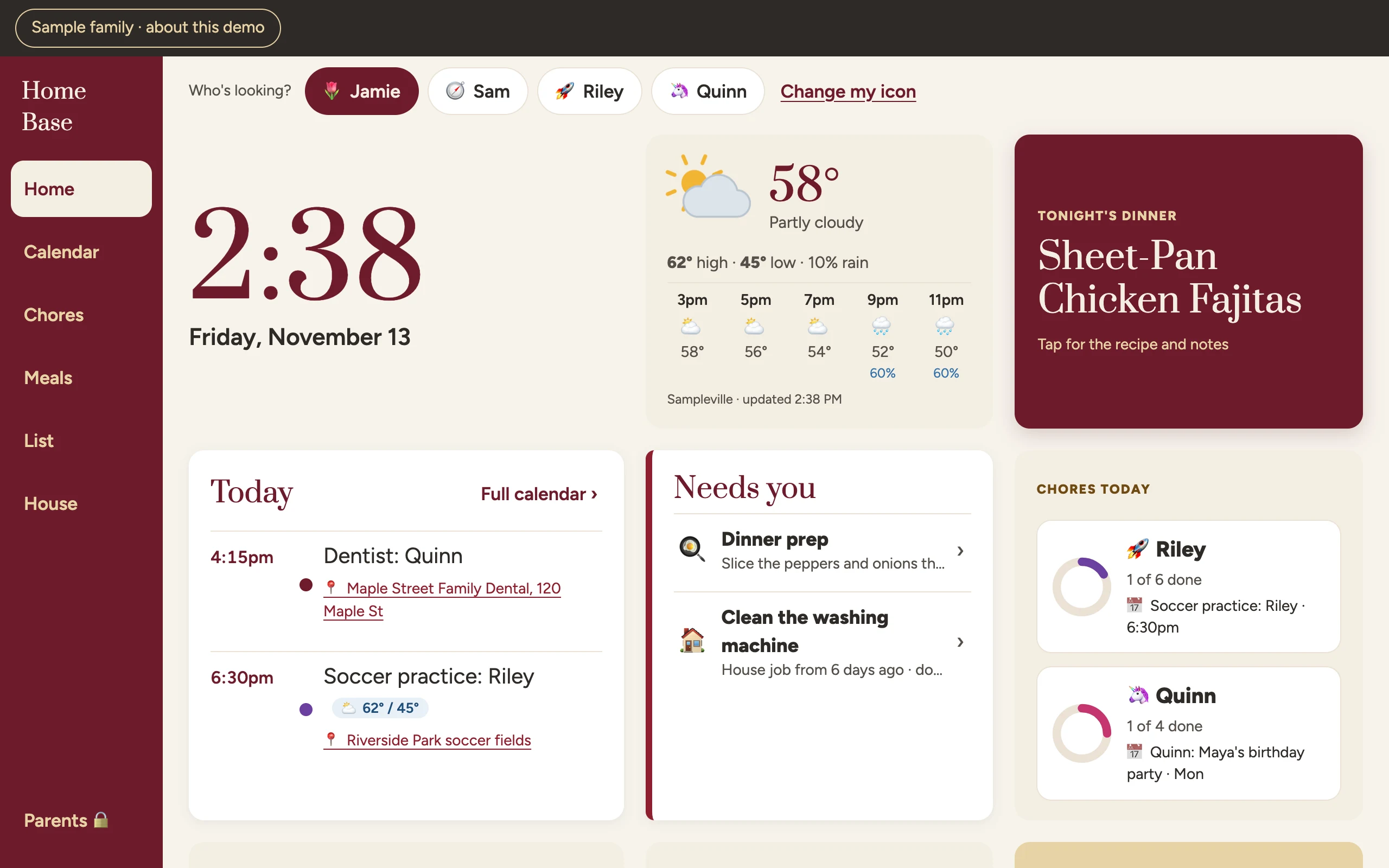
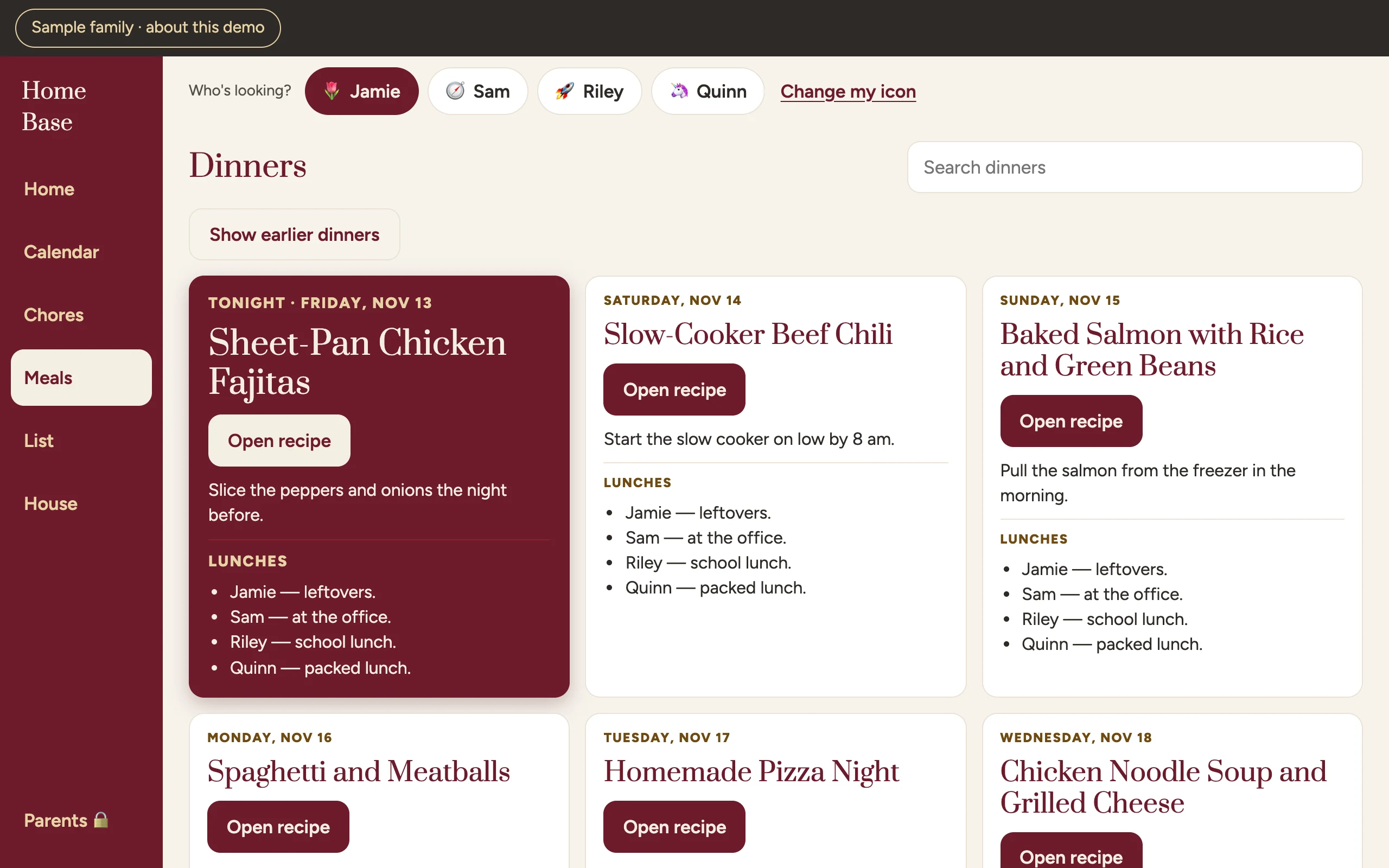
It’s an app I had AI build for our kitchen tablet and our phones. We call it Home Base. It puts our calendars, the meal plan, the kids’ chores, the shopping list and the home maintenance schedule in one place, each on its own tab, so we all look at the same thing.
| Tab | What’s on it |
|---|---|
| Home | Today’s calendar, the weather, tonight’s dinner, family notes |
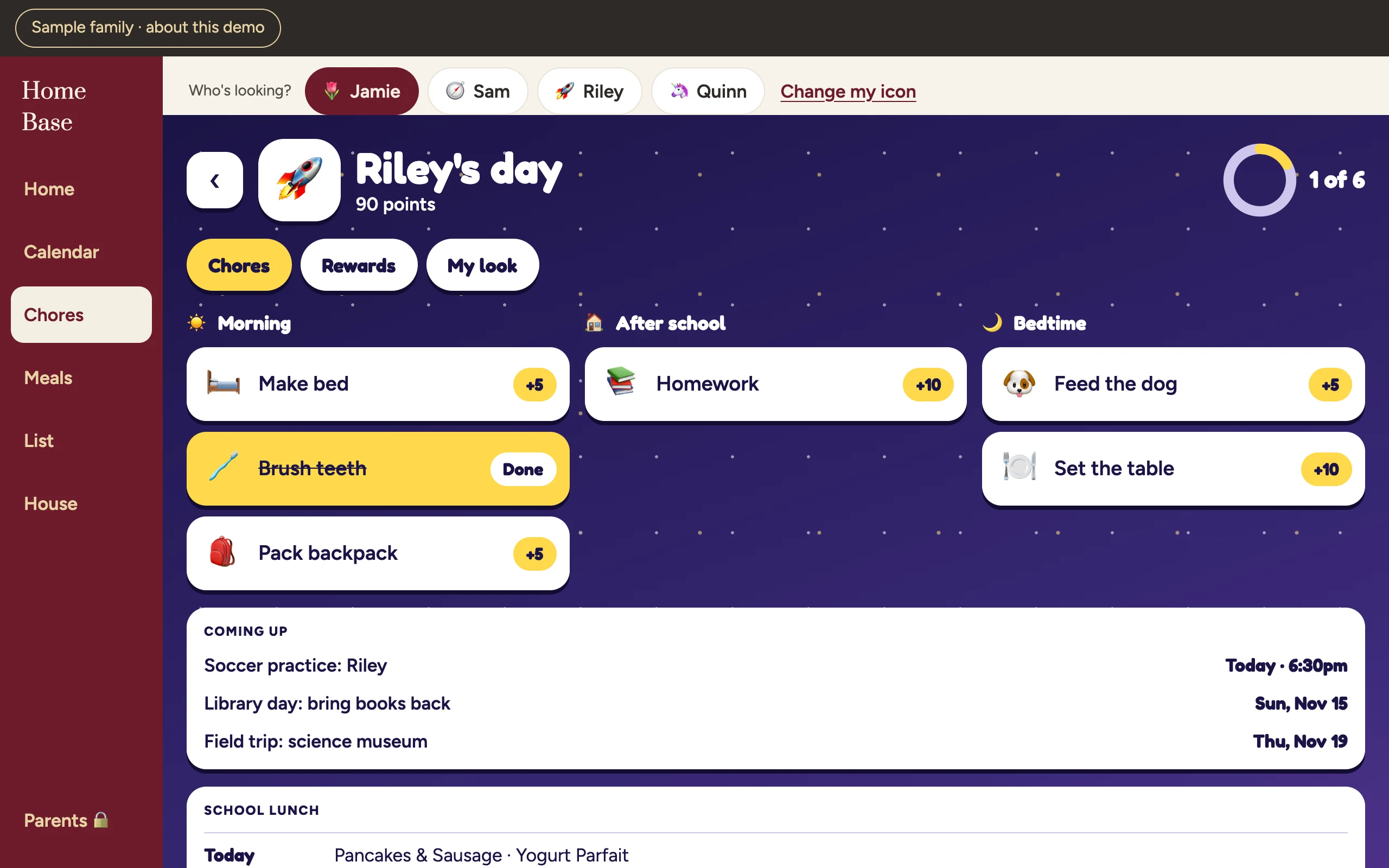
| Chores | Each kid’s chores, points and rewards, plus a to-do list for the grown-ups |
| Meals | The week’s dinners, with a link to each recipe |
| List | One shared shopping list |
| Calendar | The family calendars together |
| House | The home maintenance schedule |
I love that it’s got the meal plan for the week and it links to the recipes.
I also connected my Hue smart lights to it, so the app works as a remote for our patio lights too. (That part is extra. You don’t need smart lights for any of this.)
Why didn’t I just buy one?
For the past couple of years I’ve seen ads for home calendar tablets. I’ve been tempted a couple of times.
But I never liked the price and the monthly fees that came along with it. It would be really cool… I just didn’t want to spend the money on it.
And we already had an old tablet in the kitchen that we use to pull up recipes when we’re cooking. It’s older, but it still works just fine.
Can you build this if you can’t code?
Yes, with an AI assistant that can work on your computer. It does the technical parts. You do the sign-ins and the clicks only you can do, and you tell the assistant what you want changed.
My only coding experience was customizing my MySpace background. 😅
I tried this when Claude Fable first came out and couldn’t get it right. I got frustrated, so I set the project aside.
I was telling my kids about that the other night. My youngest looked at me and said, “Mom, you should never give up on stuff.”
She’s absolutely right.
So when Fable 5.2 came out, I tried again. It already knew my style and a lot about my family, so this seemed like a good, easy project. (Easy is questionable.)
What does it cost?
The free version costs nothing and doesn’t need a card. The full version needs a card on file with Google, because Google charges for the part that goes and gets your information. For a typical family it should be $0 to about $3 a month… usually under $1.
Some things live inside the app, like the chores and the shopping list. Those are free.
Other things live somewhere else, like your calendar. The full version checks those places for you every few minutes, even when nobody has the app open, and brings in anything new. That’s the part Google charges for.
| What you see in the app | Free | Full |
|---|---|---|
| Kids’ chores, points and rewards | Yes | Yes |
| Shopping list, family notes, to-do lists | Yes | Yes |
| Weather | Yes | Yes, plus weather alerts |
| Your calendars (Google, Apple or Outlook) | No | Yes |
| Tonight’s dinner, from a meal calendar | No | Yes |
| School lunch menu | No | Yes, for some schools |
| A list your AI assistant can read and check off | No | Yes |
Mine uses every feature, and I expect it to run a dollar or two a month. That’s an estimate. I don’t have a bill yet.
Building it used a lot more than that out of my monthly Claude plan. But once it’s running, that’s a much better deal than the other things on the market.
One thing to know… a Google budget alert only sends you an email. It doesn’t stop the spending.
That’s what it costs to run. Building it costs two more things:
- A subscription to an AI tool that can code. I used Claude Code, which comes with a paid Claude plan. One month is enough for the setup.
- Your time. Building mine from scratch took a few days of going back and forth with Claude Code. The guide and kit are there to make that part a lot shorter.
How do I get started?
Try the sample app first at homebase.aiwithheather.com. The family in it is made up, and what you change stays on your own device. Then pick one of three ways to get your own.
1. Build your own from scratch
This is what I did. You need:
- A computer for the setup, and a Google account.
- A phone or tablet you already own.
- An AI assistant that can work on your computer. I used Claude Code in the Claude desktop app.
Mine needed a paid plan. I haven’t tested it on a free plan.
Copy this into your AI
I want to build a private app for my family that runs on our kitchen tablet and our phones. It should show our calendar, tonight’s dinner, the kids’ chores and our shopping list. Ask me questions, one at a time, about where each of those lives right now and who needs to see it. Then write me a plan, starting with the simplest version, and tell me what you can build yourself and what only I can do.
Any AI assistant can help you plan it. Muse, Claude, ChatGPT and Gemini are a few of the options, and there are more. To build it, you need one that can work on your computer.
2. Use my guide and kit
This is the sped-up version. I’ve taken everything I learned and put it into a guide and a starter kit, so you aren’t starting from nothing.
Get the guide and starter kit. It’s $19, one time, and it covers both the free and the full version. You set it up yourself.
3. Work with me
If you’d rather have a one-on-one session where I help you set this up, contact me for pricing and availability.
How do I change things over time?
Go back to the AI assistant that built it and say what you want changed. You don’t change the app yourself. The assistant does. These are the things I had changed.
Tell your AI what looks off. Whatever your AI gives you at the beginning, if you don’t like it, tell it and have it fix it. Mine had things not lining up properly. And everything was formatted a little too much the same, so it was hard to read.
Keep the home page simple. I had my own tasks on the home page at first, and that was a little overwhelming. I had my to-do list moved over with the chores. Now the adults have a daily to-do list in there too, not just the kids.
Make the kids’ pages simpler than yours. The more detailed stuff is on my page and my husband’s page.
Check what it pulls in. I thought the hardest part would be getting all the different systems to talk to each other. I’m still having an issue with my calendar pulling in other things, so I have to fix that.
Ask the people using it. It’s on my husband’s phone, and I asked him to use it for a while and tell me what he thinks.
Is it worth it?
In a study of 3,000 US parents published in the Journal of Marriage and Family, mothers said they handle 71% of the household tasks that take mental effort, like planning and scheduling.
An app in the kitchen doesn’t change who does the remembering. It does put it somewhere everyone can see.
The night we showed the kids, they loved it. After they got ready for bed, they ran back downstairs to check off their chores. Confetti falls when they finish them all.
It’s working really well so far. I’m sure I’ll come up with new things to add to it the more we use it.
Keep going
- How I get my whole day in one message before the kids wake up
- How AI manages my inbox (and why it never deletes anything)
About the author: Heather Pocorobba has spent 15 years in communications, simplifying complex topics and answering the question “what does this mean for me?” She writes AI at Home with Heather, showing how anyone can use AI to get more of the household to-do list done without giving up family time. Find her at @aiwithheather.
Leave a Reply